iOS 26: Liquid Glass, Apple Intelligence, and What Changed in 2026
Liquid Glass, Apple Intelligence, and live translation: the honest guide to iOS 26 — compatible iPhones, how to update, and the bugs that still annoy.
by Cleverson Gouvêa
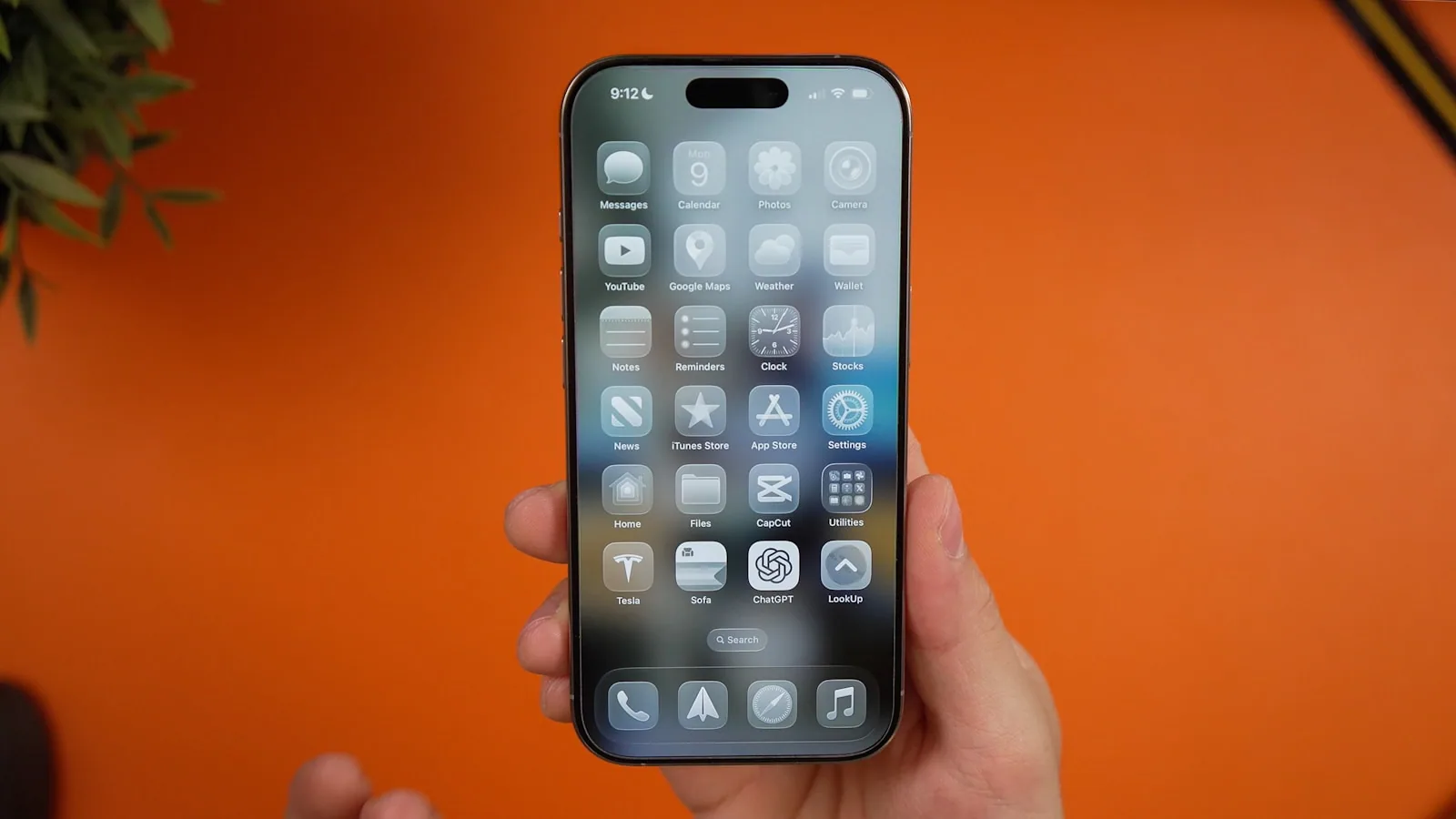
The iOS 26 is the biggest visual and functional overhaul of the iPhone operating system since iOS 7 in 2013 — and anyone who has used Apple for over a decade notices it within the first hour of use. Released in September 2025 and already on version iOS 26.5 (May 2026), the system brought the Liquid Glass interface, Apple Intelligence integrated in more places, live translation in Messages, FaceTime, and Phone, and a new year-based naming scheme. This guide breaks down what's real, what's worth it, which iPhones were left out, and how to update hassle-free.
TL;DR
- Liquid Glass is the new translucent design applied to Lock Screen, Home Screen, Control Center, and apps. Starting with iOS 26.1, you can choose between the transparent look and a colorful one (more legible).
- Apple Intelligence gained Live Translation, enhanced Visual Intelligence, and more styles in Image Playground — but requires A17 Pro chip or higher (iPhone 15 Pro, 16, 17).
- iOS 26 runs from iPhone 11 to iPhone 17 (and SE 2nd/3rd gen). XS, XS Max, and XR were left out.
- iOS 26.5 brought RCS with end-to-end encryption between iPhone and Android, new Pride wallpapers, and Maps improvements.
- Battery life drops on older models in the first 48 hours after update — it's expected, but there are adjustments that help.
Why the iPhone jumped straight to iOS 26
Apple left sequential numbering behind. Instead of iOS 19, the system unveiled at WWDC 2025 arrived as iOS 26 — aligning all of the company's operating systems (iPadOS 26, macOS 26 Tahoe, watchOS 26, tvOS 26, visionOS 26) with the main usage cycle year, 2026. It's the same logic the automotive industry uses: the iPhone sold in October 2025 is already, in essence, a "2026 model" device.
The change serves two purposes. First, it simplifies marketing messaging: when someone asks "are you on the current version?", the answer "iOS 26 in 2026" is self-explanatory. Second, it aligns internal calendars. Before, iOS 18 coexisted with macOS 15 and watchOS 11. Now, everything speaks the same language.
The practical impact for the user is zero — it's just a name. But the cultural impact is big: Apple hasn't made such a bold naming choice since the leap from OS X to macOS in 2016.
Liquid Glass: the redesign that divides opinions
Liquid Glass is the star of iOS 26. The interface gained optical qualities of real glass: refraction, depth, brightness that reacts to the display's ambient light and simulated lighting behind elements. Buttons, sliders, tabs, and even the Control Center seem to float over the content, with edges that curve like a water droplet.
Visually, it's stunning in demo videos. In daily practice, it divided the user base. Those who complained pointed out three issues:
- Low contrast on light backgrounds (gray text on nearly invisible glass in sunlight)
- Distraction during reading (subtle animations competing with content)
- "App Store demo" feeling — beautiful for 10 minutes, tiring with prolonged use
Apple listened. In iOS 26.1, released at the end of 2025, the company added a toggle in Settings > Display & Brightness that switches between the original transparent Liquid Glass and a "colorful" version — more opaque, with solid backgrounds and enhanced contrast. Those who prioritize legibility know where to go.
What changed on the Lock Screen
The iOS 26 Lock Screen became smarter. The clock now interacts with the subject of the background photo: if the image is of a person, the numbers recede to avoid covering the face. In landscapes, the clock stretches or contracts to fill negative space. Widgets gained glass edges and can be partially overlapped without losing clarity.
What changed in the Camera app
The Camera app was simplified. Instead of a horizontal row with six modes competing for attention (Time-Lapse, Slo-mo, Cinema, Video, Photo, Portrait), there are now two main modes — Photo and Video — and the rest are in a sliding menu. For those who use the iPhone as their main camera, the daily reduction in taps is real.
Apple Intelligence on iOS 26: what it delivers and what still drags
Apple Intelligence gained three new fronts on iOS 26, but following the hardware rule is mandatory: it requires A17 Pro chip or higher. In practice, this means iPhone 15 Pro, 15 Pro Max, any iPhone 16, and the entire iPhone 17 line. The standard iPhone 15 (non-Pro) — still widely sold in Brazil — misses out on generative AI, but runs Liquid Glass and classic features.
Live Translation: the most useful feature
Live translation works in three contexts:
- Messages — AI translates received text and suggests during typing. You write in Portuguese, the recipient reads in English, and the reply comes back translated.
- FaceTime — real-time captions, with side-by-side transcription of the original audio. Useful for international meetings and calls with foreign clients.
- Phone — audio translation during traditional calls. The iPhone performs simultaneous interpretation with 2 to 4 seconds latency.
This is the first time Apple delivers real-time translation without relying on a third-party app. For those working with global clients, this replaces two or three tools with one.
Visual Intelligence: from prompt to action
Visual Intelligence evolved from "identify what's in the camera" to "act on anything on your screen." You can press the Camera Control button (iPhone 16/17) or use the capture shortcut to ask questions about a web page, translate a snippet, add an event to the calendar from a poster, or buy an item similar to one in a photo. It's what Google Lens has been doing for years, now with native integration.
Genmoji and Image Playground with ChatGPT
Image Playground gained new styles via ChatGPT integration — the user chooses whether they want local generation (Apple) or remote (OpenAI), with a clear privacy notice. Genmoji now accepts references to people from contacts: you describe "my cousin Lucas wearing a cowboy hat on Mars" and the system delivers.
In practice, it's still more of a toy than a productivity tool. But for content creators on Instagram and TikTok, it has become routine.
Table: what each iPhone gets with iOS 26
| Model | Liquid Glass | Apple Intelligence | Live Translation | Visual Intelligence | Genmoji |
|---|---|---|---|---|---|
| iPhone 11 / 12 / 13 / 14 | ✅ | ❌ | ❌ | ❌ | ❌ |
| iPhone SE (2nd/3rd) | ✅ | ❌ | ❌ | ❌ | ❌ |
| iPhone 15 (standard / Plus) | ✅ | ❌ | ❌ | ❌ | ❌ |
| iPhone 15 Pro / Pro Max | ✅ | ✅ | ✅ | ✅ | ✅ |
| iPhone 16 (all models) | ✅ | ✅ | ✅ | ✅ | ✅ |
| iPhone 17 (all models) | ✅ | ✅ | ✅ | ✅ | ✅ |
iPhone XS, XS Max, and XR do not receive iOS 26 — they stopped at iOS 18 and only get critical security patches.
Call Screening, Messages with polls, and the unified Phone app
Beyond AI, three functional changes deserve attention:
- Call Screening: calls from unknown numbers are answered by the iPhone, which asks for name and reason. Only then does your device ring, with the transcription of the caller's intent already on screen. It's the death blow to telemarketing spam.
- Unified Phone: the Phone app screen now combines Favorites, Recents, Voicemail, and Contacts into a single scrollable view. For those who use the iPhone for frequent business calls, it's faster.
- Messages with polls and backgrounds: group conversations gained quick voting and individual chat wallpapers. Small, but addictive.
Those who operate customer service via the official app need to assess the impact on their routine — Call Screening reduces interruptions but may also filter out legitimate business contacts without identification. If your operation involves unlimited WhatsApp agents, the voice channel remains important and deserves careful configuration.
How to update to iOS 26 without losing data
The update is free and runs on any compatible iPhone. The process that minimizes risks is simple but requires discipline:
- Check compatibility in Settings > General > About. If your model is above iPhone 11, you're good to go.
- Make a full iCloud backup: Settings > [your name] > iCloud > iCloud Backup > Back Up Now. Wait for the status to change to "completed."
- Free up 6 to 8 GB of space: Settings > General > iPhone Storage. Delete old videos, unused apps, and browser cache.
- Ensure 50% battery (or plug in). Updating with low charge is the shortest path to a bricked device.
- Use stable Wi-Fi. Updating over 4G/5G may be blocked by the system itself and consumes data.
- Go to Settings > General > Software Update, select iOS 26 (or 26.5, the latest version), and tap Download and Install.
- Restart and wait. The first boot after the update takes longer — that's normal. Spotlight needs to reindex all content.
In the first 24 to 48 hours, the system reindexes photos, recalibrates Apple Intelligence, and updates apps. Battery and performance may fluctuate during this period. Don't conclude the update is bad before two full days.
Battery dropping after iOS 26? Do this before complaining
It's the most common complaint in Brazilian and Portuguese forums. Apple confirms the temporary impact, but there are adjustments that recover autonomy on models from iPhone 12 to iPhone 14:
- Restart the iPhone (don't just turn it off — hold the buttons until the slider appears). Clears reindexing caches.
- Audit background apps: Settings > Battery. See who's consuming the most in the last 24 hours and disable "Background App Refresh" for apps you don't use daily.
- Turn off Apple Intelligence if your model is eligible but you don't use it: Settings > Apple Intelligence & Siri. Local AI consumes energy even when idle.
- Reduce Liquid Glass: Settings > Accessibility > Display & Text Size > Reduce Transparency. Decreases GPU work and stabilizes consumption.
- Wait for iOS 26.x patch: Apple fixes battery bugs in early revisions. iOS 26.5, for example, closed over 50 vulnerabilities and optimizations.
If the loss persists after two full days of normal use, take it to service. It could be an end-of-life battery, and the update only accelerated the symptom.
iOS 26.5: what the May version brought
Released on May 11, 2026, iOS 26.5 is the most relevant version of the cycle so far:
- RCS with end-to-end encryption between iPhone and Android. Messages exchanged with Android contacts now have the same security as iMessage. It's enabled by default, with a toggle in Settings > Messages.
- Pride 2026 wallpapers, featuring "Pride Luminance" — a dynamic background that refracts colors in motion.
- Apple Maps with Suggested Places directly in the search bar. Tap to search and the system already suggests two relevant places based on time and routine.
- Inuktitut keyboard and refined options for transferring attachments to Android (none, 30 days, 1 year, all).
- Over 50 security fixes.
If you've postponed the update since September, iOS 26.5 is the right time to upgrade. The cycle's maturity is consolidated, initial bugs have been resolved, and encrypted RCS is a real privacy upgrade for those who communicate with people outside the Apple ecosystem.
Who iOS 26 is really worth it for
After eight months on the market, we can be honest about the audience:
- Absolutely worth it: users of iPhone 15 Pro, 16, and 17. They get the full package — Liquid Glass, Apple Intelligence, Live Translation, Visual Intelligence. Updating is almost mandatory.
- Worth it for design and security: users of iPhone 12 to 14. They don't get generative AI, but they receive Liquid Glass, Call Screening, encrypted RCS, and security patches. Update without fear.
- Worth it with caution: iPhone 11 and SE 2nd/3rd gen. It works, but the GPU struggles with Liquid Glass. Use the Reduce Transparency option right away.
- Not worth insisting: iPhone XS/XS Max/XR don't receive it. If you're there, it's time to consider a replacement — not for AI, but for the security risks of a discontinued system.
For companies with a fleet of iPhones used commercially (customer service, sales force, management), the recommendation is to validate internally before pushing the update. Legacy corporate apps may have visual bugs with Liquid Glass in the first weeks after a major version release.
Conclusion: the most ambitious iOS of the decade
iOS 26 is Apple's boldest bet since the iPhone X. The combination of Liquid Glass as a design manifesto, Apple Intelligence as local AI infrastructure, and Live Translation as a real communication enabler places the iPhone in a different category — not as hardware, but as an integrated software platform.
The price of this ambition is fragmentation. For the first time in years, two iPhones with the same iOS deliver profoundly different experiences: an iPhone 16 with full AI and an iPhone 13 with a beautiful interface but no generative features. Those buying today need to know which side of the line they want to be on.
If you manage an operation that depends on mobile — whether it's a custom Moodle app for your school or customer service through official channels — it's worth following Apple's roadmap for the next 12 months. Local AI changes what's possible in automation within the iPhone, and the first commercial use cases are already arriving.
Related posts
How Much Does iOS & Android App Development Cost in 2026?
Real-world pricing, factors that increase app costs, new Apple and Google policies for 2026, and annual maintenance budget.
Protecting Your Web Server from Attacks: WAF, fail2ban, and Rate Limiting
94% of logins on the Cloudflare network are bots. Learn how WAF, rate limiting, and fail2ban block attacks before they take down your site.
Linux Server Hardening: Checklist for Web Servers
Is your website running on your own VPS with no dedicated sysadmin? This checklist covers the hardening steps we apply to every inherited server, including common pitfalls that can lock you out.