iPós EaD App: Postgraduate Degrees Go Mobile
The iPós VLE is now an app on Google Play and the App Store. Study offline while commuting, using your same login. Find out how to install it.
by Cleverson Gouvêa
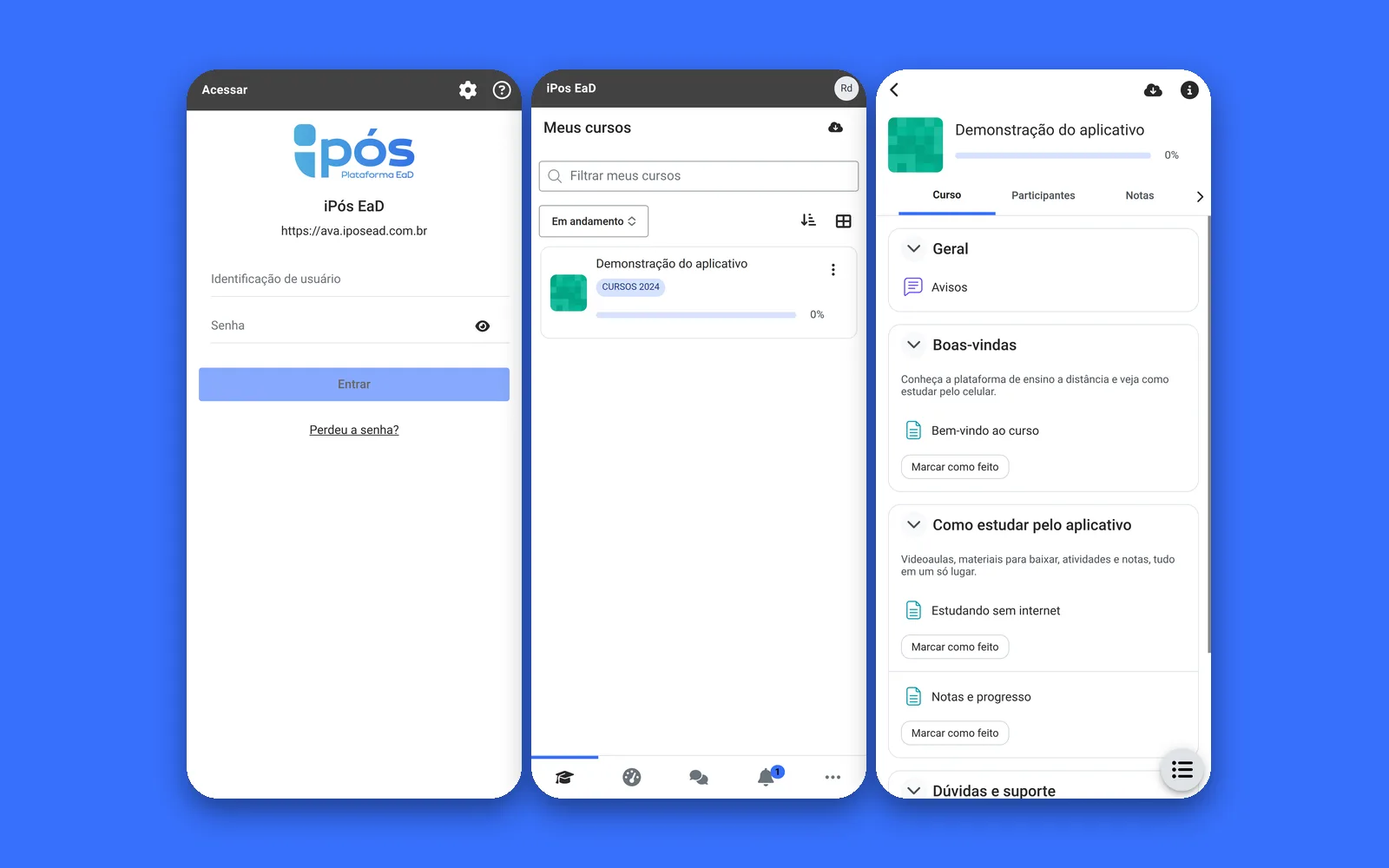
The iPós EaD app has arrived on Google Play and the App Store. Students pursuing distance postgraduate degrees at iPós can now access the VLE directly from their mobile phones, using their usual login. They can also download lessons to study without internet access on the bus, during a shift, or while waiting in line at the bank. Below, I'll explain how to install it, what works offline, what doesn't yet, and what this launch teaches other institutions.
Summary
The iPós EaD app is published on Google Play and the App Store, where it appears as iPOS. Version 5.2.2 has been approved and is live in both stores.
It was generated from the official Moodle App (version 5.2), with the iPós logo, colors, and VLE address pre-configured. Students do not need to enter any website address.
Login: Use the same username and password as your iPós VLE account. Account creation is not available through the app.
Content can be downloaded for offline study. Push notifications are still being activated, so deadlines remain on the course calendar.
On iOS, the app is for iPhone only (iOS 15 or later). There is no iPad version.
What is the iPós EaD App and Where to Download It
The iPós EaD app is the official application for the iPós Virtual Learning Environment (VLE), the platform where postgraduate courses, video lessons, activities, and grades are hosted. It's not a new system. It's the same Moodle platform that students already use in their browser, but as a mobile app installed on their phone, featuring the institution's brand on the icon.
We, at Agathas Web, generated the application from the official Moodle App code, maintained by Moodle HQ, version 5.2. We then applied iPós's brand identity and pre-configured the VLE address. After that, we managed the publication process in both app stores, including registration, listing details, privacy policy, and review.
ItemGoogle Play (Android)App Store (iPhone)Store NameiPOSiPOS (“Your Postgraduate Degree on Your Phone”)Live Version5.2.25.2.2DevicesAndroid PhonesiPhone and iPod touch only, iOS 15 or laterPriceFreeFree, no ads, no in-app purchasesLoginVLE Username and PasswordVLE Username and Password
On the App Store, the listing indicates a 58 MB download and a 12+ age rating due to messaging between students and instructors. The data declared in the privacy section includes what's necessary for the app to function: name, email, user ID, and device ID, in addition to content that the student themselves submits.
Why “iPOS” and Not “iPós EaD” in the Store
The short name fits entirely under the icon on the phone's home screen without being cut off. On the App Store, the subtitle “Your Postgraduate Degree on Your Phone” explains what it's about. In practice, students can find the iPós EaD app by searching for “iPOS” or using the official links provided by the institution.
For Students Pursuing Postgraduate Degrees on Their Phones Amidst Their Routine
The typical distance learning postgraduate student works all day. They study during their commute, on their lunch break, while waiting at an office, or between shifts. For these individuals, their mobile phone is the primary classroom, not a backup plan.
While the VLE works in a mobile browser, it comes with friction points:
Repeated Login. The browser often loses the session, requiring students to re-enter their username and password every time they open it.
Signal Dependency. Without internet, the page won't load. On the subway or highway, lessons can stop mid-way.
Address to Remember. Students need to save the link to their favorites or search for it in their enrollment email.
The iPós EaD app solves all three. Students install it once, log in with their VLE credentials, and the session remains active. Content downloaded via home Wi-Fi is then available later, without a signal and without consuming their data plan.
What Students See Inside the App
Upon first opening the iPós EaD app, students will find the courses they are enrolled in, with the same sections and activities that appear in the browser. They can watch lessons, read materials, submit assignments, track grades, consult the calendar, and exchange messages. All of this comes directly from the Moodle App itself: we didn't reinvent features; we simply delivered the official app customized for iPós.
How to Install the iPós EaD App on Android and iPhone
Installing the iPós EaD app takes just a few minutes. I recommend installing it with Wi-Fi, as the first access downloads the course list.
On Android
Open Google Play on your phone.
Search for iPOS or tap directly on the official app link on Google Play.
Verify that the app is from the institution (the icon features the iPós brand) and tap Install.
Open the app. It's pre-configured for the VLE, so the initial screen will directly prompt for your username and password.
Log in with the same username and password you use at ava.iposead.com.br.
On iPhone
Open the App Store.
Search for iPOS or use the official link on the App Store.
Check that your iPhone is running iOS 15 or later (Settings > General > About).
Tap Get and confirm with Face ID, Touch ID, or your Apple account password.
Open the app and log in with your VLE username and password.
Common Issues During First Access
“Invalid username or password.” The app uses the exact same VLE credentials. If you don't remember your password, reset it via the VLE website, then return to the app.
Not appearing on iPad. This is expected: on iOS, the app was published for iPhone only. On iPad, please use the browser.
Trying to create an account via the app. This is not possible. Access is granted through enrollment; the app only uses existing accounts.
Studying Offline with the iPós EaD App: What Works and What Doesn't
In the iPós EaD app, downloading content for offline study is the feature that most impacts students on the go. It's based on the official Moodle App, and the Moodle documentation on offline features clearly outlines its scope and limitations. It's important to understand both aspects before relying on it for a last-minute submission.
What Can Be Downloaded
Students can download an individual item, an entire section, or the whole course. Most resources (files, pages, books, folders) are available without internet. Assignments, forums, and other activities can be completed offline and are submitted once the connection is restored.
What Doesn't Work Without Internet
External Links (Moodle's “URL” resource) are not downloaded. If a lesson points to a video on another website, it requires a connection.
Chat and external tools (LTI) do not work offline.
Third-party plugins generally do not either.
Offline quizzes only work if the instructor configures them specifically: no time limit, with deferred feedback behavior, no network restrictions, and with the offline attempt option activated via the app. Otherwise, quizzes require an internet connection.
Synchronization: The Detail That Catches Students Off Guard
What you do offline is stored on your phone until it synchronizes. The documentation states that automatic synchronization runs every 10 minutes when connected, and on iOS, the app needs to be open and in the foreground for this to occur. The practical rule I convey to students is simple: after completing an activity offline, open the app with an internet connection and verify that the submission appeared in the VLE. Do not leave a deadline submission merely “saved on your phone.”
Deadlines: How Not to Miss Submissions While Studying on Your Phone
Distance learning postgraduate programs often have many short courses, each with its own deadlines.
The iPós EaD app helps by making the calendar and activity timeline accessible with a single tap. On the home screen, students can see what's due in the coming days across all courses, without needing to enter each course individually.
A point of transparency: push notifications for the iPós EaD app are still being activated. This means that, for now, your phone won't automatically alert you about deadlines. Until this feature is live, the recommended routine is:
Open the app at least once a day, preferably with an internet connection, to update your timeline.
Check the calendar at the start of each course and note submission deadlines in your personal phone calendar.
Continue reading announcements sent by the coordination team through usual channels, such as email.
I prefer to state this clearly rather than promise a feature that is still being rolled out.
What Institutions Gain with Their Own App in the Stores
Now, for those managing an institution and considering doing the same.
Your Brand on Students' Phones, Every Day
With the generic Moodle App, students install an app that carries the Moodle brand and must manually enter the institution's website address. It's common for students to enter the wrong address, give up, and return to the browser. With the iPós EaD app installed, the icon on the home screen features the institution's branding, the colors are theirs, and the VLE address is pre-configured. A complete comparison between the two models is available in the post Moodle Mobile App vs. Custom Moodle App.
Less Support Needed for First Access
Incorrect website addresses are a classic support ticket for the generic app. With a pre-configured address, this type of support request simply disappears. What remains are password issues, which are the same as with the browser.
Store Presence as Proof of Credibility
A student who finds their postgraduate program's app in the store, complete with a listing, privacy policy, and updated version, perceives an organized institution. But it's not magic: the benefit only materializes if the underlying VLE is well-configured and fast.
When a Custom App Isn't Worth It
It would be dishonest to sell an app to everyone. I do not recommend proceeding now if:
the institution has few active students and hardly anyone accesses it via mobile;
the VLE is still unstable or slow in the browser (the app will inherit this issue);
courses rely almost exclusively on external links and LTI tools, which do not work offline;
there is no budget for maintenance, as inactive apps in stores become outdated and eventually get removed.
To put numbers to this decision, I wrote the guide Custom Moodle App: When the Investment Pays Off.
Behind the Scenes: What It Took to Launch the App
Generating the build is the short part. The real work happens around it.
Developer Accounts and Verification
Apple Developer Program: costs $99 per year, according to Apple's enrollment page. For organizations, it requires a D-U-N-S number, a functional institutional website, and an email address within the institution's domain.
Google Play Console: one-time fee of $25. Organization accounts also require D-U-N-S, and Google itself advises that verification can take up to 30 days.
The D-U-N-S is free, but Apple requests up to 5 business days for issuance and up to 2 additional days to receive the data. Those who start without it lose weeks.
Technical Rules That Change Annually
As of August 31, 2026, new apps and updates on Google Play must target Android 16 (API 36), according to the Android API level requirement. Already published apps below Android 15 (API 35) will no longer be visible to new users on newer Android devices. This is why we started with a current version of the Moodle App, 5.2, rather than an adapted older code.
Choices We Made for iPós
iPhone Only on iOS. Publishing the iPós EaD app for iPad as well would require dedicated screens and testing. Starting with iPhone only reduced the scope without impacting those who study on their mobile phones.
Brazilian Portuguese as the default language, because that is iPós's target audience.
Push Notifications Later. We preferred to launch the app and activate notifications at a steady pace rather than holding up the entire launch because of them.
Two Versions Until Approval. Version 5.2.1 was released first; 5.2.2 is the one approved and live in both stores.
How Agathas Web Solves This
The iPós EaD app is the most recent case, but the process is the same one we offer to any institution using Moodle that wants a custom Moodle application with their own brand.
What's Included:
generation of the app from the updated official Moodle App, with your logo, icon, colors, and VLE address pre-configured;
support in creating developer accounts in the institution's name, including D-U-N-S;
store listings, privacy policy, and data declarations required by Apple and Google;
submission for review, response to store adjustment requests, and publication;
maintenance: new Moodle App versions, API level updates required by Google, and certificate renewals.
How It Works in Practice: the app communicates with your existing Moodle instance via official web services. There's no need to migrate servers, courses, or users. If your VLE requires prior adjustments (performance, version, mobile web services), we handle that collaboratively, as we also manage Moodle servers and managed hosting.
How to Engage Our Services: you can reach us via WhatsApp on the custom Moodle application page. We'll conduct a diagnostic of your VLE and your audience, then send a proposal with scope and timeline. Each project has its own pace, as it depends on accounts, store reviews, and any integrations you may desire.
If you want to know what has changed in the official application before deciding, the post on Moodle App 5.1 in 2026 summarizes the foundation upon which we work.
Conclusion: The Mobile Phone Has Become the Postgraduate Classroom
For students, the iPós EaD app removes friction: saved login, downloaded content for offline study, and visible deadlines on the home screen. Simply install via the official link, log in with your VLE username, and remember to synchronize what you've done offline.
For institutions, the message is different. Postgraduate students already study on their mobile phones, with or without an app. The difference is whether they do so within an icon featuring your brand or within any generic browser. If your institution wants to follow iPós's path, explore Agathas Web's custom Moodle application and request a diagnostic.
Related posts

Moodle Workplace 5.3: What's New and What It Means for Enterprise L&D
Multi-tenant accounts, AI queries capped at 500 rows, and a revamped catalog: what Workplace 5.3 delivers and how to achieve the same results without premium licensing.

Moodle 4.5.16 Security Vulnerabilities: What Each Advisory Means for Your LMS
SQL injection, IDOR across courses, and XSS in SCORM: The 13 Advisories from 11/20/2026 Explained for LMS Administrators.
Moodle Configurable Reports: Critical Vulnerabilities and How to Respond
Two CVEs hit Moodle's most widely used custom reporting plugin. Check if your LMS is exposed and how to patch without breaking administrative reports.